Skyrocket Your eCommerce Growth with Google Analytics 4
As an eCommerce business owner or digital marketing professional, understanding how people interact with your store is essential. Google Analytics 4 (GA4) provides the insights you need to optimize your customer experience and grow your sales. With GA4’s ecommerce reporting features, you can analyze product performance, identify drop-offs, and uncover opportunities to improve your checkout flow, all based on real data.
In this article, you’ll learn how GA4 helps you measure and improve your eCommerce performance. We’ll explore key reports and metrics, how to set up tracking, and how to interpret the insights that matter most for your business.
Setting Up eCommerce Tracking in GA4
Before exploring reports, make sure GA4 is collecting your ecommerce data correctly. You can implement tracking using the Google Tag Manager (GTM) ecommerce templates or directly within your website’s code. Here’s a quick overview of what you need to do:
- Implement eCommerce Events: Use Google Tag Manager or your platform’s built-in integration (like Shopify, WooCommerce, or BigCommerce) to send the recommended ecommerce events to GA4. These include
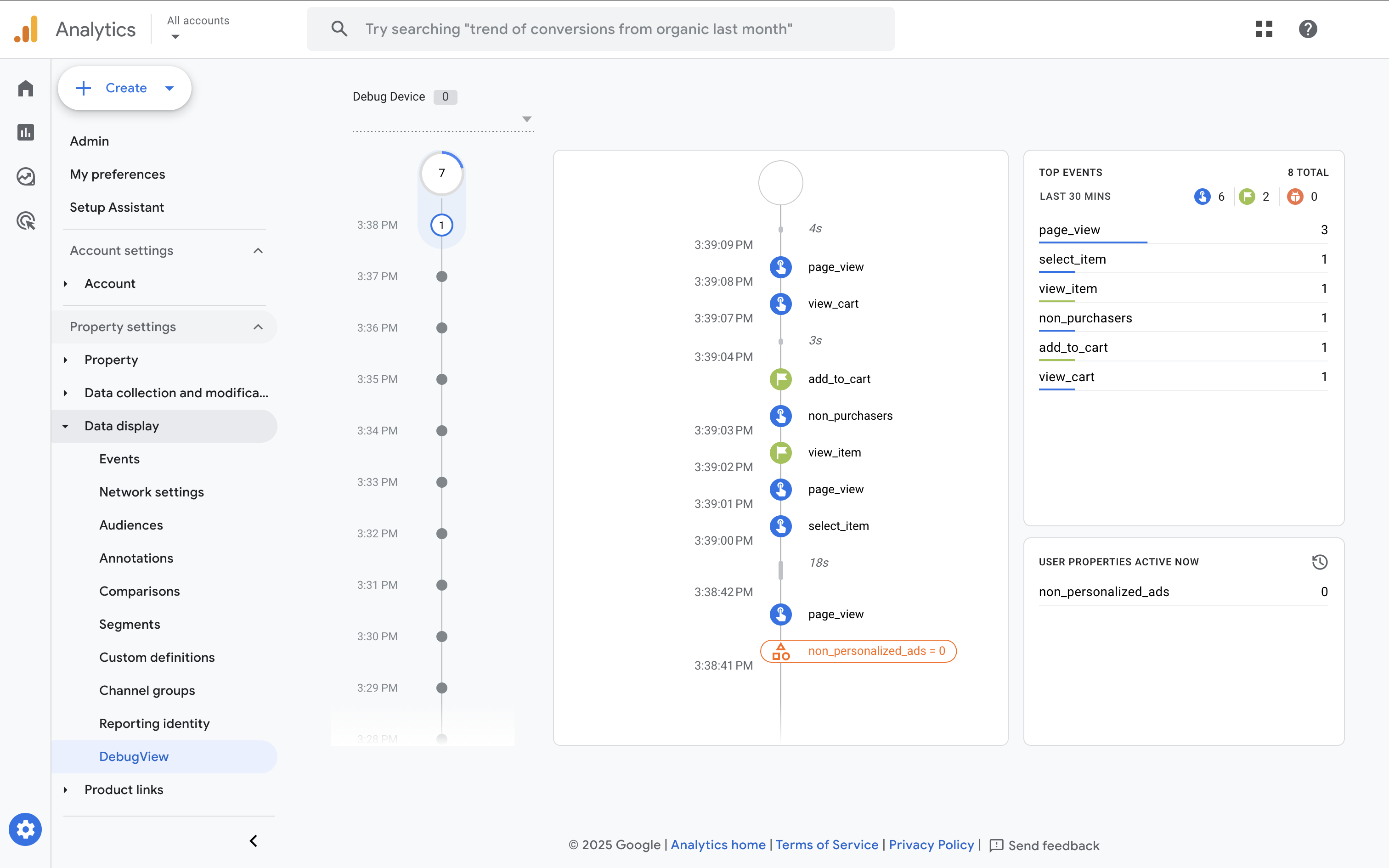
view_item_list,add_to_cart,begin_checkout,add_payment_info, andpurchase. - Verify Your Setup: Navigate to 'Admin' and select 'DebugView' to test your setup and confirm your events are triggering correctly before publishing your tags.
Analyzing Product and Category Performance
Once tracking is live, head to 'Monetization' and select the 'Ecommerce purchases' report in GA4. This section lets you see which products and categories generate the most revenue and engagement.
Key metrics to explore include:
- Item revenue and quantity: Identify your top-selling and underperforming products.
- Item views vs. purchases: See which items attract attention but fail to convert, which is a signal to revisit pricing or product details.
- Item list performance: Understand which category or product lists drive the most engagement and clicks.
Tip: Use comparisons or filters to analyze specific product lines or campaigns. For example, comparing seasonal products or promoted items.
Understanding Shopping Behavior
The 'Shopping behavior' report (under 'Monetization') shows you how users move through your purchase funnel. By visualizing steps like viewing items, adding to cart, and starting checkout, you can identify where people drop off.
Look for patterns such as:
- Low add-to-cart rates: May indicate unclear product details or unexpected costs.
- High checkout drop-off: Could mean too many form fields or limited payment options.
Use these insights to improve the user experience. Even small changes, like simplifying navigation or adding trust signals can increase your conversion rate.
Optimizing the Checkout Funnel
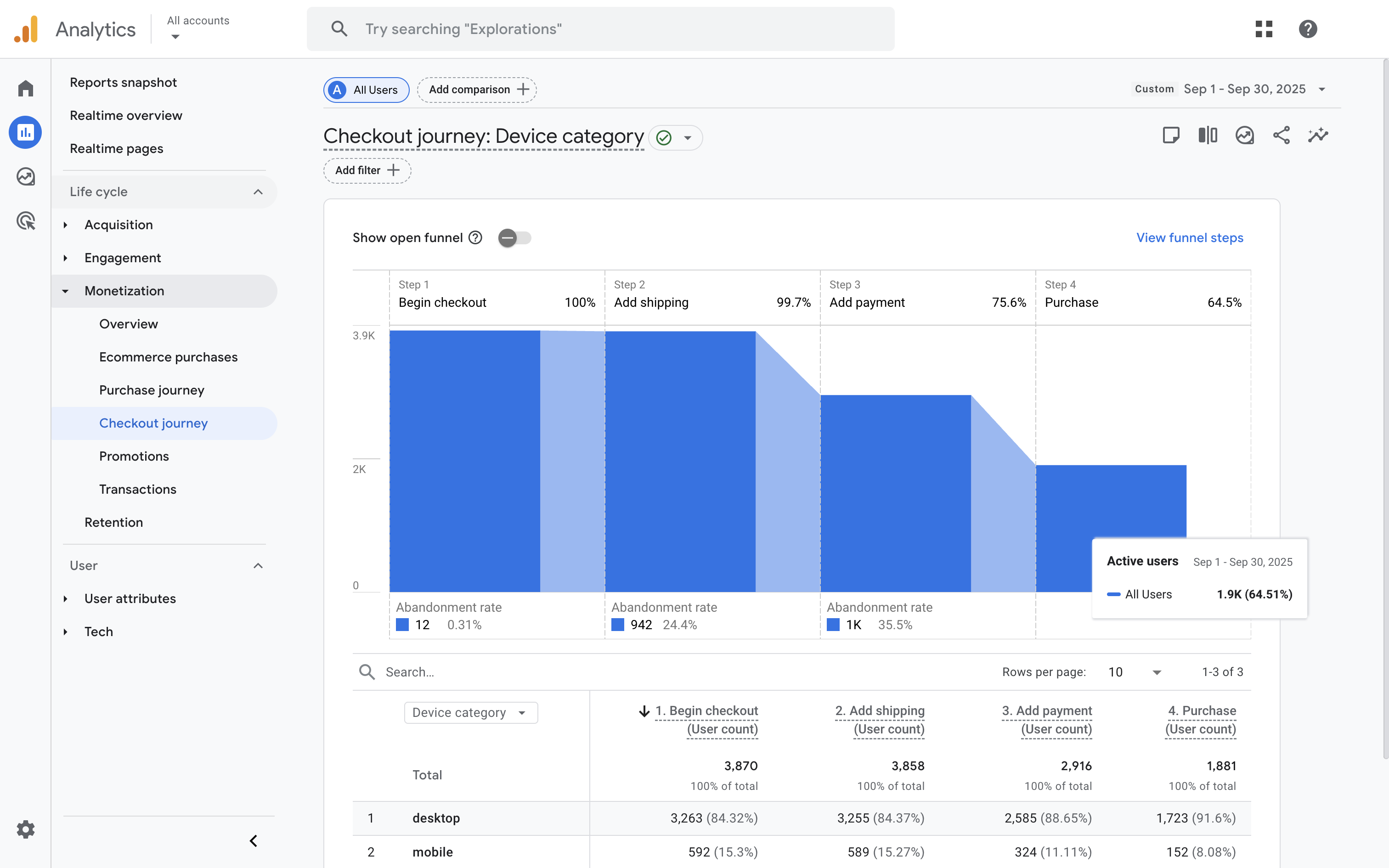
GA4’s checkout-related events help you see how people progress through the final steps before purchase. In the 'Checkout journey' report (also under 'Monetization'), you’ll see events such as begin_checkout, add_shipping_info, and purchase.
Use this data to identify and fix friction points:
- Form drop-offs: Simplify your checkout process and test shorter forms.
- Payment gateway issues: Monitor conversion rates by payment method. Gor example, compare credit card vs. PayPal or Afterpay, to ensure a smooth experience for all users.
Using Data for Continuous Improvement
To get the most from GA4, think of it as an ongoing optimization tool rather than a one-off setup. Schedule regular reviews of your ecommerce reports, test new strategies, and monitor results over time.
Here are a few best practices to follow:
- Track key events consistently: Maintain clean, consistent naming for events and parameters to ensure accurate reporting.
- Build custom explorations: Use the 'Explore' workspace to create funnel and path analyses tailored to your store.
- Measure the impact of marketing: Link GA4 with Google Ads to see which campaigns drive the most profitable purchases.
Tip: Add audiences in GA4 based on shopping behavior. For example, “added to cart but didn’t purchase”, and share these with Google Ads for remarketing.
Conclusion
Google Analytics 4 gives you the clarity to understand how your customers shop, where they drop off, and what drives them to buy. By setting up ecommerce tracking, exploring the Monetization reports, and acting on what you learn, you can refine your strategy and take your online store’s performance to the next level.
Keep analyzing, testing, and improving. GA4’s insights can help you make confident, data-driven decisions that lead to long-term growth.